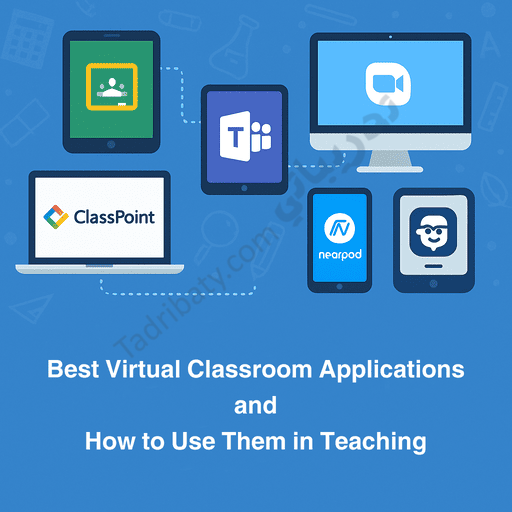
Education has witnessed significant development over the past few years with the widespread adoption of virtual classrooms, which have become an essential part of modern learning systems. Along with this transformation, Best Virtual Classroom Applications have emerged as effective educational solutions that meet the demands of the digital age. These digital environments have enabled teachers and students to communicate efficiently, share files, manage activities, and deliver lessons in an interactive way that aligns with contemporary learning needs.
Virtual classroom applications play a central role in supporting distance learning and blended learning, as they offer flexible solutions that enhance the quality of teaching both inside and outside the classroom.
In this article, we explore the best virtual classroom applications and explain how to use them effectively in teaching.
First: Best Virtual Classroom Applications
Google Classroom is one of the most widely used platforms in schools and universities due to its simplicity and seamless integration with Google services.
Key Features:
- Easy creation of virtual classes
- Digital assignment distribution and grading
- File management through Google Drive
- Instant communication with students
Why Is It Important?
It simplifies lesson organization and brings all learning tools together in one collaborative platform.
2- Microsoft Teams for Education
A powerful platform designed for managing virtual classrooms and video-based learning.
Key Features:
- Live video lessons and meetings
- Breakout Rooms for group work
- Assignments and quizzes through Microsoft Forms
- Easy content sharing and management
Why Is It Important?
It supports collaborative learning and provides an integrated environment, especially for schools using Microsoft systems.
One of the most popular virtual meeting applications used in teaching.
Key Features:
- High-quality audio and video
- Interactive whiteboard tools
- Lesson recording and playback
- Small discussion rooms for students
Why Is It Important?
It is ideal for interactive lessons that rely on discussion and live presentations.
A powerful add-in for PowerPoint that transforms presentations into interactive learning experiences.
Key Features:
- Live questions during lessons
- Instant quizzes
- Real-time annotation on slides
- Continuous student performance tracking
Why Is It Important?
It turns traditional presentations into engaging interactive lessons, both in-class and online.
An interactive teaching platform that integrates activities directly into lessons.
Key Features:
- Ready-made, customizable lessons
- Live activities such as drag-and-drop and multiple choice
- Virtual reality (VR) support
- Instant performance reports
Why Is It Important?
It makes learning more engaging and increases student participation.
A social learning platform that resembles social media but within a secure academic environment.
Key Features:
- Sharing assignments and learning materials
- Safe discussion spaces for students and teachers
- Student progress tracking
Why Is It Important?
It is ideal for building an interactive learning community within the classroom.
Second: How to Use Virtual Classroom Applications in Teaching
1- Managing Lessons and Time Effectively
Virtual classroom applications help organize lesson time through:
- Digital lesson plans
- Structured activity sequences
- Time reminders
This ensures more balanced and well-managed lessons.
2- Enhancing Classroom Interaction
Teachers can boost engagement using:
- Live polls in ClassPoint and Nearpod
- Interactive whiteboards in Zoom and Teams
- Classroom discussions in Edmodo
This transforms students from passive learners into active participants.
3- Supporting Collaborative Learning
Through:
- Breakout discussion rooms
- Group projects using Google Docs and OneDrive
- Shared tasks in Teams or Classroom
These practices enhance teamwork and communication skills.
4- Providing Immediate Feedback
Tools such as Google Forms and Nearpod offer:
- Instant activity results
- Error analysis
- Personalized feedback for each learner
This allows teachers to address learning gaps immediately.
5- Monitoring Student Progress
These applications provide dashboards that display:
- Task completion rates
- Participation levels
- Individual student performance compared to the class
This enables data-driven instructional decisions.
6- Providing Diverse Learning Resources
Teachers can integrate:
- Educational videos
- Interactive links
- Educational games
- Higher-order thinking activities
This enriches lessons and makes them more engaging.
Conclusion
Virtual classroom applications have become an integral part of modern education. They offer flexible learning environments that enable teachers to manage lessons effectively, enhance interaction, and improve learning quality. When used strategically, these tools increase student engagement and provide teachers with powerful resources to deliver innovative and high-quality instruction.
Read also:
• Useful Educational Platforms and Their Role in Developing the Educational Process
• Interactive Tools in Education and Their Role in Promoting Active Learning
• Ready-to-Use Classroom Activities for Teachers (Immediately Applicable in the Classroom)
• Differentiated Instruction – Practical Steps and Classroom Examples